Skip to content
gamebit

Play now

Keyboard and mouse, like on a PC, or a gamepad (choose its buttons in Controls)

Jetman

MS-DOS 1,095 games

No plays yet · 1991 · 1 player

Stuart Collier, Ovine by Design

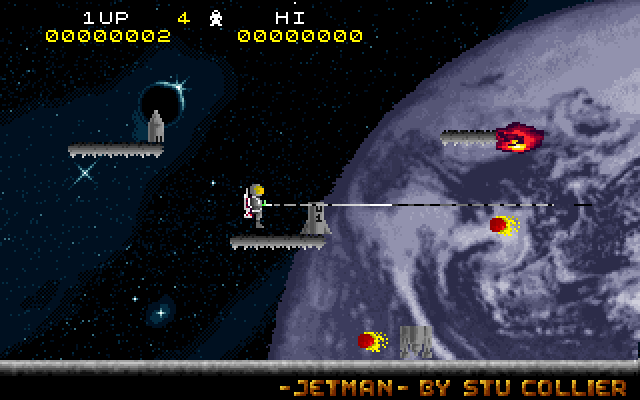
Jetman is an unofficial remake of ZX Spectrum game Jetpac (not to be confused with Jetpack ), a single-screen shooter with a sci-fi theme. You control an astronaut with a jetpack and a laser rifle, who needs to assemble a rocket and fill its fuel tanks, all the while being assaulted by flying projectiles and/or creatures that come from all directions. The screen is wrapping, meaning that once you

#shooter

Comments

Sign in to comment and reply.

Text only, no links. Be kind to others: comments can be reported.

About Jetman

Developer
Stuart Collier, Ovine by Design
Year
1991
Console
MS-DOS
Players
1 player
Genres
Shooter

History

Jetman is an unofficial remake of ZX Spectrum game Jetpac (not to be confused with Jetpack), a single-screen shooter with a sci-fi theme.

You control an astronaut with a jetpack and a laser rifle, who needs to assemble a rocket and fill its fuel tanks, all the while being assaulted by flying projectiles and/or creatures that come from all directions. The screen is wrapping, meaning that once you or the monsters reach one side of the screen, you appear on the other. So are the player's laser shots, which is really helpful in keeping at least one part of the screen clear of monsters.

Once you have assembled the rocket and fuelled it up, you need to board it and leave, only to return seconds later (perhaps implying that you've travelled elsewhere, but the scene doesn't change), starting the next stage, with more dangerous enemies that have more complex movement patterns, thus being harder to hit or dodge.

Jetman is overall a faithful reproduction of the ZX Spectrum original, but updates the visuals to 256-colour graphics and adds digitized sound effects and music in the main menu.

The game was originally released as shareware but later made freeware by its author, Stuart Collier.

How to play

Use the arrow keys to fly around, TAB to shoot.

Description by MrFlibble

Text from the original source. View source

Screenshots